Frequently Asked Questions
Q. What are the plans for future development of Adobe PageMaker software?
A. Widely credited with launching the desktop publishing revolution (together with the Apple Macintosh and
Adobe PostScript® printers), Adobe PageMaker has enjoyed a long and venerable product life. When it was
first released 20 years ago, in 1985, it transformed the way designers work. Since then, it has introduced many
innovative design and layout features, and served millions of design customers worldwide. However, it was first
created when coding standards were quite different and its role as a leading publishing tool has now passed to
Adobe InDesign CS2, which offers a more extensive design toolset and a modern codebase that can adapt easily
and swiftly to the needs of today’s designers. That’s why Adobe no longer plans to develop and release any feature-
based versions of Adobe PageMaker, nor do we plan to offer a version of PageMaker with native support
for Mac OS X. While we continue to sell PageMaker 7.0 and to offer technical support and customer service for
it, we encourage you to switch to Adobe InDesign CS2. As a loyal PageMaker customer, you’re entitled to special
pricing for this upgrade, and you’ll find a lot of support for making the transition.
Q. Will Adobe continue to have maintenance releases or patches to Adobe PageMaker 7.0?
A. At this time, Adobe has no plans to provide maintenance releases or patches for Adobe PageMaker 7.0, nor
to offer a version that natively supports Mac OS X (you can run PageMaker 7.0 in Classic mode on Mac OS X
systems that support it). However, Adobe continues to monitor user experience in case issues should arise.
Q. What are my options for upgrading from PageMaker to InDesign CS2?
A. We highly recommend upgrading from Adobe PageMaker to Adobe InDesign CS2 PageMaker Upgrade, a
full version of InDesign CS2 that’s been specially priced at $349 (U.S.) just for PageMaker users. We expect to
ship InDesign CS2 PageMaker Upgrade in May 2005 and are accepting pre-orders today on the Adobe Store
(www.adobe.com/store). Purchase the upgrade directly through the online Adobe store or from any Adobe
Authorized Reseller. To install the InDesign CS2 PageMaker Upgrade, you must have a valid serial number
from any previous version of PageMaker.
Q. What are the main benefits of upgrading to InDesign CS2 over remaining with PageMaker?
A. The question some PageMaker users ask is “Why switch when my product works?” The answer is simple:
Adobe InDesign CS2 works significantly better. InDesign CS2 combines the best aspects of PageMaker with
productivity-enhancing features that take page design to a new level, so you can work smarter and faster than
ever. Designed for the latest technologies, InDesign runs smoothly on Mac OS X, Windows 2000, and Windows
XP systems. InDesign CS2 integrates tightly with the other Adobe products you use every day, including Adobe
Photoshop®, Illustrator®, GoLive®, and Acrobat® software, so you can move between these products efficiently
to get your work done. It’s packed with innovative features that can handle any page design project from a onepage
flyer to a complex book with a detailed index, including multiple undo/redo, flexible table creation, character
styles, and state-of-the-art printing controls. It also expands your creative toolkit with editable drop shadows,
gradients, arrowheads, stroke styles, and more. InDesign CS2 is also a component of Adobe Creative Suite
2, the complete design environment for print, Web, and mobile publishing. For details about Adobe Creative
Suite 2, visit www.adobe.com/creativesuite.
Q. Are there other reasons to switch from PageMaker to InDesign CS2?
A. Adobe InDesign CS2 delivers a number of features that appeal strongly to PageMaker users, including:
• Story Editor Enter, edit, and format text in the Story Editor, an integrated word-processing view that
works similarly to one in PageMaker and helps you change and copy-fit text efficiently.
• Control palette Use the context-sensitive Control palette to style text, edit graphics, and fine-tune tables—a
handy alternative to switching among the Character, Paragraph, Transform, Stroke, and Table palettes.
• Direct PDF export Export PDF files in Adobe Acrobat 7.0 (PDF 1.6), 6.0 (PDF 1.5), 5.0 (PDF 1.4), and
4.0 (PDF 1.4) format using built-in controls—you no longer need to install a PostScript® driver and
Acrobat Distiller to export PDF files!
• Multiple undo/redo Undo or redo a virtually unlimited number of steps. Almost any action you can take
can be undone or redone, so you can experiment more freely with your design ideas.
• Character styles Quickly apply consistent text formatting to short runs of text using character styles,
which can include a rich set of formatting attributes.
• High-resolution preview of graphics Display low-resolution versions of graphics for faster performance.
Then switch individual images to high-resolution display with a quick shortcut.
• Arrowheads/Stroke style editor Apply built-in strokes and arrowheads to the beginning and end of lines.
Also, create and save custom stroke styles with stripes, dots, or dashes.
• Gradients Define and apply linear or radial gradients. Then apply them to the stroke and fill of graphics
and text. These items—even text—remain completely editable.
• Transparency Apply editable drop shadows, feathering, and other opacity settings to produce naturallooking
transparent effects in InDesign. Maintain soft edges when placing transparent Photoshop files.
• Tables Create tables within InDesign in a few quick steps. Also import Word and Excel tables directly or
turn tab-delimited text files into tables. Then refine how the tables look with automated controls.
• Outstanding typography Automatically produce the best line breaks possible using the unique Paragraph
Composer. Also create ligatures, hang punctuation, insert special characters, identify missing fonts on-screen,
and produce beautifully kerned text automatically. Set type using new OpenType® fonts with complete access
to a wide range of OpenType characters, including basic fractions, discretionary ligatures, and more.
Printing Print InDesign files reliably to PostScript Level 2, PostScript 3™, and non PostScript printing
devices using an efficient printing interface that reflects the input of thousands of print professionals
worldwide. Prevent costly mistakes before they appear on film or on press by using the new Separations
Preview and Flattener Preview palettes to evaluate plates and transparency flattener settings onscreen.
• Native support for Mac OS X Run InDesign CS2 on Mac OS X, version 10.2.8–10.3.8. InDesign has supported
Mac OS X since InDesign 2.0 was released in January 2002.
In addition to these features—many of which have been on PageMaker users’ wish lists for some time—
InDesign CS2 is packed with new and exciting features, such as Adobe Bridge, object styles, the ability to
control the visibility of layers in Photoshop and PDF files, and snippets (re-usable parts of an InDesign
page), which strengthen your design toolkit. For more information, visit www.adobe.com/indesign.
Q. Didn’t Adobe used to offer a product called Adobe InDesign CS PageMaker Edition? What happened
to that? Why aren’t you updating it for InDesign CS2?
A. Yes, Adobe previously offered PageMaker users a special version of InDesign CS called Adobe InDesign
CS PageMaker Edition, also priced at $349 (U.S.), to support making the switch from PageMaker to
InDesign. This special version included the following:
• Adobe InDesign CS software with all of the productivity-enhancing layout and design features it offered.
• The Adobe PageMaker Plug-in Pack, a set of plug-ins that added popular PageMaker features to
InDesign CS, such as the ability to open PageMaker 6.0 files, switch shortcuts in InDesign to match those
in PageMaker, basic imposition support, data merge, automated bullets, and more. (See the next question
for more details about these features.)
• Comprehensive training materials produced specifically to help PageMaker users get to work quickly and
explore InDesign features more deeply.
We are not updating this version for InDesign CS2. Instead, we’ve incorporated the “add-on” features
offered in the PageMaker Plug-in Pack directly into InDesign CS2. In other words, the basic imposition,
data merge, and other features designed to ensure that PageMaker users have all of the functionality they
need are now a standard part of InDesign CS2. PageMaker users can still get special pricing, however,
through the InDesign CS2 PageMaker Upgrade.
Q. What are the PageMaker specific features that are now included in InDesign CS2 (and that were
formerly part of the Adobe PageMaker Plug-in Pack as noted in the previous question)?
A. Adobe InDesign CS2 incorporates the features below to ensure that PageMaker users have all of the functionality
they need for a smooth transition:
• Publication converter for PageMaker 6.0 files Convert PageMaker 6.0 document and templates to
InDesign CS2 format, and in some cases even fix damaged PageMaker files or open previously unopenable
PageMaker files (with limitations). This capability expands the conversion support that has long
been built into InDesign, enabling you to open PageMaker 6.5–7.x and QuarkXPress 3.3–4.x documents.
• InBooklet Special Edition (SE) plug-in Automatically rearrange a document’s pages into printer spreads for
professional printing with complete control over margins, gaps, bleeds, creep, and crossover traps—a process
known as imposition. The InBooklet SE plug-in—created by third-party developer A Lowly Apprentice
Productions (ALAP)—offers this selection of imposition styles: 2-up saddle stitch, 2-up perfect bound, and
2-, 3-, and 4-up consecutive.
• Automated bullets and numbering Automatically create and style bulleted and numbered lists or save
them as part of paragraph styles. Numbered lists update automatically when changes are made.
• Data merge Create customized publications, such as catalogs, direct mail campaigns, business cards, form
letters, and mailing labels by merging data from a spreadsheet or database into your InDesign CS2 layouts.
• Position tool Resize and move images and their frames or reposition content in relation to frames using
the handy Position tool, which works similarly to the Crop tool in PageMaker.
• PageMaker compatible keyboard shortcuts Work at peak efficiency by switching the keyboard shortcuts
in InDesign CS2 to match the shortcuts you’ve already learned for PageMaker.
• PageMaker toolbar Enjoy easy access to commonly used commands through a Windows-style toolbar
similar to ones used in Acrobat and Microsoft Word. Available for both Mac OS and Windows users.
Previously this functionality was available through the Adobe PageMaker Plug-in Pack, which you could add
on to InDesign CS or Adobe Creative Suite, or through Adobe InDesign CS PageMaker Edition (which is no
longer offered because the functionality is now a standard part of InDesign CS2).
Pricing and Availability
Q. How much does Adobe InDesign CS2 cost? How much does Adobe InDesign CS2 PageMaker
Upgrade cost?
A. The table below lists the estimated street prices for retail and upgrade versions of Adobe InDesign CS2
(prices exclude applicable taxes and shipping):
Region Retail Price (ESP) Upgrade Price (ESP) InDesign CS2 PageMaker Upgrade
U.S. and Canada $699 (U.S.) $169 (U.S.) $349 (U.S.)
Europe 1129 € (Euros) 249 € (Euros)† 529 € (Euros)†
Japan ¥88,000 ¥25,000 ¥65,000
Rest of World (ROW) $699 (U.S.) $169 (U.S.) $349 (U.S.)
Volume licensing options are also available. That information will be available on the Adobe Web site at www.adobe.com/store/
openoptions/main.html after the product is announced.
† Upgrades for Danish, Finnish, and Norwegian versions may be 5% higher.
Q. I really want to upgrade from PageMaker to InDesign today and can’t wait until your expected
ship date in May 2005. Can I still get Adobe InDesign CS PageMaker Edition?
A. Yes. We will continue to sell Adobe InDesign CS PageMaker Edition, as well as Adobe PageMaker Plug-in
Pack (for those who already own InDesign CS), until InDesign CS2 is available to ship. You may purchase
Adobe InDesign CS PageMaker Edition from the Adobe Store (www.adobe.com/store) or from an Adobe
Authorized Reseller for $349 (U.S.), plus applicable taxes and shipping. To install this upgrade, you must
have a valid PageMaker serial number. If you already own InDesign CS but want to add on the PageMaker
features described earlier in this document, you can purchase and download the Adobe PageMaker Plug-in
Pack from the Adobe Store for $49 (U.S.).
System Requirements
Q. Does Adobe InDesign CS2 PageMaker Upgrade support Mac OS X and Windows XP natively?
A. Yes it does—what’s more, InDesign has supported these two platforms since Adobe InDesign 2.0 was
released in January 2002.
Q. Will you release a Mac OS X compatible version of Adobe PageMaker 7.0 ?
A. No, Adobe has no plans to update Adobe PageMaker 7.0, so we will not be releasing a new version to
support Mac OS X natively. You can run Adobe PageMaker in Classic Mode on OS X systems that still support
Classic Mode.
Q. What are the system requirements for Adobe InDesign CS2 PageMaker Upgrade on the Mac OS?
on Windows?
A. Before upgrading from PageMaker to InDesign CS2, we encourage you to make sure that your system
meets the minimum system requirements listed below:
System Mac OS Windows
Processor PowerPC® G3, G4, or G5 processor Intel® Pentium® III or 4 processor
Operating system Mac OS X (version 10.2.8–10.3.8) Microsoft® Windows® 2000 with Service
Pack 3 or Windows XP
RAM 256 MB (320+ MB recommended) 256 MB (320+ MB recommended)
Available hard-disk space 870 MB 850 MB
for installation*
CD-ROM drive Yes Yes
Monitor resolution 1024x768 monitor resolution with 1024x768 monitor resolution with
16-bit or greater video card 16-bit or greater video card
PostScript printer Adobe PostScript Level 2 or Adobe PostScript Level 2 or
Adobe PostScript 3 required Adobe PostScript 3 required
Multimedia support QuickTime 6.0** or later installed QuickTime 6.0** or later installed
Product activation Internet or phone connection Internet or phone connection
Adobe Stock Photos† Broadband Internet connection Broadband Internet connection
* During installation, you will need at least 500MB more free hard disk space for the installer to work properly. If you don’t
have this space available, the installer will alert you. In addition, a portion of these files—Adobe common files such as Adobe
Bridge or online Help—must be installed on your main hard drive. If you install on an external drive, the installer will install
the application on the external drive and the Adobe common files on your main drive.
** Included with Mac OS X, v. 10.2.8–10.3.8, and available for free on the Apple Web site.
† The Adobe Stock Photos service may not be available in all countries, languages, and currencies and is subject to change. Use
of the service is governed by the Adobe Stock Photos Terms of Service. For details, visit www.adobe.com/adobestockphotos.
Q. I need to upgrade to InDesign CS PageMaker Edition right away. What are the system requirements
for that version of InDesign?
A. Here are the minimum system requirements for InDesign CS PageMaker Edition:
System Mac OS Windows
Processor PowerPC G3, G4, or G5 processor Intel Pentium II, III, or 4 processor
Operating system Mac OS X (version 10.2 and 10.3) Microsoft Windows 2000 with Service
Pack 2, Windows XP Home Edition, and
Windows XP Professional Edition
RAM 128 MB 128 MB
Available hard-disk space InDesign CS: 350 MB InDesign CS: 312 MB
for installation PageMaker Plug-in Pack: 237 MB PageMaker Plug-in Pack: 258 MB
CD-ROM drive Yes Yes
Monitor resolution 256-color at 1024x768 Video card that supports 256-color at
monitor resolution 1024x768
PostScript printer Adobe PostScript Level 2 or Adobe PostScript Level 2 or
Adobe PostScript 3 required Adobe PostScript 3 required
Q. Can I use Adobe InDesign CS2 on Tiger (Mac OS X, version 10.4)?
A. At this time, Mac OS X version 10.4 has not yet been released, so compatibility testing for InDesign, and
other components of Adobe Creative Suite 2, is not complete. For updated information once Tiger becomes
publicly available, visit www.adobe.com/creativesuite.
Support for Making the Switch from PageMaker to InDesign
Q. Is InDesign easy for PageMaker users to learn?
A. Yes! First of all, InDesign is designed to integrate tightly with other Adobe products. For example,
if you use Photoshop and Illustrator, you can get up to speed quickly with InDesign just by applying
what you already know. In addition, while InDesign has a more modern look and feel than Page-
Maker, these products share the Adobe standard interface you know well—so many of your PageMaker
skills will translate directly to working in InDesign. You can even switch the keyboard shortcuts to
match the ones you know from PageMaker 7.0 (and you can edit any shortcut to be what you want).
A guide on converting from PageMaker to InDesign is available in the InDesign area of the Adobe Web site
at www.adobe.com/indesign.
Q. Can I open PageMaker documents in InDesign CS2?
A. Yes, InDesign CS2 opens PageMaker 6.0–7.x files directly through the File > Open command. InDesign is
able to map PageMaker layout elements to InDesign equivalents to preserve the look and feel of documents
as closely as possible.
Q. How do I find service providers who are experienced at printing InDesign files?
A. Visit partners.adobe.com/asn/partnerfinder. Then click Search for an ASN Service Provider, fill out the
online form, and click Search. The Adobe Partner Finder enables you to search by product and metropolitan
area to locate the InDesign printing support you need. If you do not find the service provider you need, you
can e-mail Adobe for help. You can even request that Adobe provide information to your current service
provider about how to work with InDesign files (we have comprehensive training information available).
Q. Where do I find trainers who will train on InDesign?
A. Many of Adobe’s ASN Training Providers support InDesign. Just visit partners.adobe.com/asn/partnerfinder.
Then click Search for an ASN Training Provider, fill out the online form, and click Search. In addition,
the InDesign product area on the Adobe Web site provides comprehensive information about training
videos from Total Training, newsletters of InDesign tips and techniques, third-party books, and other
resources that can help you master InDesign quickly and make the most of its powerful tools. For more
details, visit www.adobe.com/indesign.
More about PageMaker Support
Q. Will Adobe continue to sell Adobe PageMaker 7.0?
A. Yes. Adobe PageMaker 7.0 continues to be a popular layout tool, so Adobe continues to sell it. However,
we strongly encourage PageMaker customers to take advantage of special pricing and in-depth support to
switch to InDesign CS2.
Q. Will Adobe continue to provide technical support and customer service for PageMaker users?
A. Yes, Adobe continues to provide technical support and customer service for PageMaker users. Registered
users of PageMaker 7.x (as well as other current Adobe products) are eligible to receive complimentary
person-to-person support on issues relating to installation and product defects, including crashes and
errors caused by Adobe software. In addition, Adobe offers online help through the Adobe Knowledgebase
and Adobe Studio. Adobe also offers several levels of flexibly priced Expert Support for more in-depth technical
help with Adobe software. In North America, Adobe Customer Service provides information about
sales, products, policies, training resources, and programs for all Adobe customers seven days a week from
6 a.m. to 8 p.m. Pacific time (visit www.adobe.com/support/intlsupport.html to locate support providers in
other regions worldwide). For more information about our support policies, visit www.adobe.com/support.

Showing posts with label Adobe PageMaker. Show all posts
Showing posts with label Adobe PageMaker. Show all posts
| In :
Adobe PageMaker
| In :
Adobe PageMaker

Master deadlines in design and print production
Adobe® Creative Suite® 4 Design Standard software is the essential toolkit for print design and production. Discover new tools and efficiencies for delivering your ideas in print with confidence.
Did you know...
It's easy to express your creative vision
Run with your ideas using full new versions of your favorite tools in a comprehensive design environment. Deliver breathtaking images, sophisticated graphics, exquisite typography, and precise layouts that print reliably.
Simplified workflows increase productivity
Design more efficiently than ever before. New, simpler ways of working help you do more in less time, moving smoothly among design tools from concept to print.
Collaboration is convenient
Work live with clients and colleagues, near and far, by hosting a web meeting or sharing your screen. Learn from an extensive community of Adobe experts by accessing technical content online — from inside your design software.
Tightly integrated creative environment
Latest and greatest design tools new
Discover new levels of creative opportunity and efficiency with all-new versions of professional Adobe tools for print, web, interactive, and mobile design.
Common user interface new
Come up to speed quickly with the help of the consistent interface across all of the creative tools.
Exceptional integration enhanced
Work more productively than ever thanks to the exceptional integration of the tools in Creative Suite 4 Design Standard. Easily exchange native file formats to streamline content creation across design disciplines.
Support for industry standards and best practices enhanced
Take advantage of the professional output options you need for every design discipline, from print to web to mobile. Adobe's ongoing focus on open standards means your work can easily go wherever you want.
Support for the latest Mac OS and Windows systems enhanced
Experience the ultimate in performance by running Design Standard natively on Intel® based Macs and computers running Microsoft® Windows Vista®. Work smoothly on legacy PowerPC® based Macs and Windows® XP systems, as well.
Efficient installation and management enhanced
Simplify installation and software management using a single installer and serial number. Install all components at once, or install only those you most need now, and add more components later (one user per license).
Efficient, powerful page design with Adobe InDesign CS4
Creative possibilities enhanced
Create stunning designs in Adobe InDesign® CS4 using tools that enable free-flowing expression, with fine control over graphics, typography, color, transparency, effects, and placed images.
Productivity that flows enhanced
Move between tasks naturally and efficiently for fast, productive page layout in a flexible design environment.
Persuasive content enhanced
Create high-impact, personalized content and long documents tailored for unique audiences using logical, condensed steps and advanced features such as automatic page addition and deletion.
Rich interactive documents new
Build rich content using Adobe Flash® technology and create engaging PDF documents that include professional typography and top-quality page design.
New dimensions in digital imaging with Adobe Photoshop CS4
Access to full editing power enhanced
Take greater advantage of all that Adobe Photoshop® CS4 offers with a more intuitive user interface and features that put you in control.
Amazing results enhanced
Bring your vision to life with industry-leading tools that let you enhance images and create composites that help meet your highest standards.
More efficient way to work enhanced
Be more productive by taking advantage of smooth integration with other Adobe software and enhancements that leverage the power of today's faster graphics processors.
Inspired vector graphics creation with Adobe Illustrator CS4
Powerful creative tools enhanced
Explore multiple design options and generate intricate graphics using robust creative features in Adobe Illustrator® CS4. Industry-standard drawing tools and powerful effects allow you to experiment freely and quickly achieve just the look you want.
Smooth and efficient workflow enhanced
Accomplish more and stay in the groove by working directly on the artboard. Interact with tools and options more easily and complete your projects efficiently using a wealth of innovative, timesaving features and shortcuts.
Delivery virtually anywhere enhanced
Move easily between Illustrator and other Creative Suite 4 components while confidently delivering graphics for print, interactive experiences, video, mobile, and motion effects. Print delivery is more reliable with Separations Preview. And with new user interface similarity among the tools, work across Creative Suite components is virtually seamless.
PDF file creation and collaboration with Adobe Acrobat 9 Pro
Rich interactive content and versatile print design combined new
Enjoy native support for Adobe Flash technology, enabling reliable, cross-platform sharing of video, animations, and applications in Adobe Acrobat® and Adobe Reader® software. PDF files have never been so lively and compelling.
Convenient, effective collaboration online new
Help ensure that colleagues, clients, and partners are on the same page at the same time with the new ability to conavigate documents, to provide clarity and enhance discussion.
Unparalleled PDF workflows for professional creative production enhanced
Prepare high-quality, press-ready PDF files for print production workflows faster and more intuitively with enhanced preflight and automatic correction features. Intelligent, automatic Overprint Preview helps ensure that overlapping elements will print correctly.
Online services
Adobe Community Help new
Access the power of an online search engine from within Creative Suite 4, but with more targeted results. Searchable content includes the in-depth, product-specific Help that Adobe has always delivered, plus additional Adobe and third-party content chosen by experts at Adobe and in the design and production communities.
Adobe Kuler new
Explore, create, and share color themes with Adobe Kuler™. Kick-start your creative projects with color inspiration from the online Kuler community, accessible from the new Kuler panel within some Creative Suite 4 components, the Kuler website, and the Kuler Adobe AIR™ application. Browse and search for thousands of themes, download directly into your Swatches panel, and even upload your own themes to share.
Adobe ConnectNow from Acrobat.com new
Sign up for Acrobat.com, a set of online services you can use to create and share documents, communicate in real time, and simplify working with others. Thanks to the ability to access one of the Acrobat.com services, Adobe ConnectNow, from within many Creative Suite 4 components, you can meet live over the web and share your screen with up to two online guests for no charge.
| In :
Adobe PageMaker
Adam Greenfield

Adam Greenfield is the author of Everyware: The dawning age of ubiquitous computing. He is principal of New York City-based, strategic design consultancy Studies and Observations, which focuses on helping clients present complex technological products and services that are humane, easy to understand, and easy to use. Adam previously headed up the information architecture department for the Tokyo office of well-known digital consultancy Razorfish.
No boundaries: The challenge of ubiquitous design
by Adam Greenfield
Sometimes a change in technology has implications that are so epochal that everyone must wrestle with them, accommodate them, or prepare for them. The revolution in information technologies known as “ubiquitous computing” (or ubicomp) is the most recent such change, and it is beginning to impact the practice—and the business—of digital design.
The phrase “ubiquitous computing” was coined by the late Mark Weiser, in work at Xerox PARC that dates back to the late 1980s. He saw ubicomp as the next logical step in our relationship with the digital tools we use, an inevitable consequence of the historic shift from many users sharing one machine to many devices serving one user. As Weiser described it, ubiquitous computing is information processing that has left the desktop behind, and been distributed throughout the built environment: “invisible, but in the woodwork everywhere.”

Nor was Weiser the only one who had ideas along these lines. Similar efforts were launched at a wide variety of think tanks, corporate “visioning centers” and academic research facilities, where terms ranged from “pervasive computing” to “ambient intelligence” to “tangible media.” I subsume all of these activities into a broader, umbrella category, which I call “everyware.”
Booting up
At the moment, most of the “ubiquitous” projects that have so far seen the light of day consist of one-off, bespoke pieces, prototypes designed by engineers with the needs and predilections of other engineers in mind. Examples include PARC's early “tabs,” “pads” and “boards,” Georgia Tech's transitional Smart Floor of the late '90s, or NTT's recent Red Tacton “body-area networking” system—which uses the human body's own electrical field to convey information wirelessly. They're proofs of concept more than anything else, nowhere near refined enough for the relentless crush of everyday life.
However, there is now a steady stream of applications that have moved beyond the lab. Since 1997, residents of Hong Kong have been using a single, Radio Frequency Identification (RFID)-equipped smart card called “Octopus” for everything from purchasing rides on the tram and snacks at the corner store, to getting in their front door. A Pittsburgh-based startup called BodyMedia offers a wireless biometric monitor little thicker than a BandAid. The data it collects is interpreted using information-visualization software that creates a “physiological documentary of your body,” which can be shared with your doctor through a secure website. Meanwhile, companies as diverse as Samsung, Intel® and Apple, sensing unparalleled opportunities in the amorphous area where communication, information, and entertainment converge, are all making a play to own the “digital home.”
The home, the garment, and the store become sites of processing and mediation. Ordinary objects are reimagined as places where facts about the world are gathered, considered, and acted upon. And all the familiar rituals of daily life—things as fundamental as the way we wake up in the morning, get to work, or shop for our groceries—are remade as an intricate dance of information.

In South Korea, an entire city called New Songdo is being built from the ground up with ubiquitous technology incorporated into every door, every bus stop, and garbage can. Ostensibly, a life in New Songdo (or the other “u-cities” even now being planned) will be streamlined and made less burdensome at every turn by the application of information processing to the myriad challenges of everyday life; the measures contemplated include everything from weather forecasts displayed on the bathroom mirror in the morning to garbage that credits your account when properly recycled.
In relying on an infrastructure of wirelessly-communicating, embedded processors, all these systems exhibit the signature interaction style of ubiquitous computing: a transaction between a person and an information-processing system that proceeds automatically without the need for action, intention, or even consciousness of what is taking place—what I might call “information processing dissolving in behavior.”

Everyware icon: Information processing dissolving in behavior.
What are we waiting for?
The current situation resembles the dawn of the World Wide Web, before the global brand agencies and management consultancies launched their interactive units, before browser and markup standards had been hashed out. It's useful to remind ourselves that it took a few years for a community to evolve that was capable of dealing with the web, both institutionally and technically—and that the challenges of everyware are more complex, by many orders of magnitude.
Providing for acceptably good user experience in the ubiquitous context is also more difficult than it is on the desktop or the web. Every one of the interactions presented by a day in the life of a citizen of New Songdo—from filling the bathtub to getting to work on time to programming the weekly grocery selection—is rife with potential for the kind of breakdowns, crashes, and defaults that we PC users have had to get used to over the past few decades. And this time, they aren't confined to a box on the desktop, but scattered through the most intimate circumstances of our lives.
But technology may be the least of our difficulties. Designing ubiquitous experiences requires a comprehensive understanding of how people differ from one another, and how those differences affect what they want and how they ask for it. This recognition is embodied in the emerging discipline of interaction design, taught at places such as the MIT Media Lab, Interaction Design Institute Ivrea, and New York University's Interactive Telecommunications Program. Ideally, programs like these give their students an understanding of the magnitude of the challenge implied anytime the deployment of information technology in everyday life is contemplated

The most basic fact of ubiquitous computing is that it takes place out in the world, in a much more volatile, complicated and unpredictable environment than that presented by the relatively bounded arena of the web. People come and go, their needs and desires changing from moment to moment according to a context that is rarely made explicit. Observing ordinary people in the course of their daily activities; modeling their needs with sensitivity, insight, and accuracy; and developing an appropriate vocabulary for their interaction with the technical systems around them is a hurdle no less significant because it is human.
The big screen
The distribution of processing power throughout the environment means that interacting with computational services via the customary combination of screen and keyboard is no longer practical. Ideal for the one-to-one relationship of user and machine implied by personal computing, the screen and keyboard make little sense in the relatively unbounded, fluid, multi-user context of everyware. New interfaces incorporating touch, gesture, and voice recognition will come into play.

Specifying just how people will use these interfaces is an area in which the practice of design will have to change. How does one design an interactive experience that is not centralized on a screen? Over what is now a full decade of experience with the World Wide Web, designers have become accustomed to a more-or-less standard array of deliverables used in site development, from mood boards through to wireframes and technical use cases. While many of these documents will retain their utility in developing for ubiquitous systems, the challenges posed by the latter case—accommodating the needs of multiple users, each free to move in both three-dimensional space and time, as they deal with multiple interactive systems—suggest that entirely new types of deliverables are becoming necessary. These may have more in common with architectural blueprints, or even choreographic notation, than anything we'd currently recognize as a digital-design document.
A major challenge implicit in modeling ubiquitous interactions is distinguishing utterances and gestures intended to be system commands from other casual behaviors. Systems will constantly be faced with the question: “Are you talking to me?” The user will be engaged in transactions with other people and other co-located technical systems, and there is a constant risk of misinterpretation as their behavior will be inherently less predictable than that of someone seated before a keyboard, engaged in a more-or-less dedicated relationship with a single computer. Both our design practice and the associated deliverables will have to account for this variability.
The potential imperceptibility of ubiquitous services in a given environment is also a challenge. Icons, visual signage systems, or other obvious indicators will need to be developed, simply to explain to the unknowing public that ambient information is available. Some proposed icons along these lines illustrate this article. Alternatively, we may also want to indicate when services are not available. There are many reasons, privacy being not the least of them, why we might wish to escape the network.
We already have a hint as to how signage might interact with ubiquitous system, thanks to the various “spatial annotation” efforts that have cropped up in the last few years such as Semapedia, or the QR codes so prevalent in Japan. The latter let anyone with a camera-equipped phone (and that's just about everyone) snap a picture of a QR-enhanced sign, or map, or business card, and get taken directly to the relevant website. But, for the most part, these contemporary efforts rely on 2D barcodes to convey information, which presents us with both a problem and an opportunity: beyond the fact that such barcodes are obviously not human-readable, they're simply ugly. A world liberally peppered with 2D barcodes would be an aesthetic affront. Meaningful, aesthetically-pleasing indicators, legible to all kinds of people—perhaps something along the lines of the Yellow Arrow project—would go along way toward making pervasive annotations less problematic. The project only awaits the energy, insight, and talent of the right designer.
Out of the box
Our notion of information technology as being confined to these boxes we call “computers” is changing thoroughly, permanently, and irrevocably. While currently the power of information technology is easily accessible only to a relative few, confined to a comparatively narrow band of circumstances, and used to address only certain kinds of situations, everyware will invest much of the built environment with processing power, with implications for just about all of the things we do there.
This is why, perhaps surprisingly, I think of everyware not so much as a computing challenge, but as a social challenge. The consequences of endowing the objects and surfaces of everyday life with processing power will are much bigger than a single industry. Based though it may be on the widely distributed deployment of microprocessors, the concepts most useful for understanding everyware will be those drawn from the study of social and cultural evolution.
If New Songdo is indeed a valid template for life in the ubiquitous city—and this very much remains to be seen—then information technology will play a prominent role in most of the choices made by most people on most of the days of their lives. Assuming that the inevitable stumbles can be handled by the equivalent of 404 errors or blue-screen crashes is unacceptably naive. We'll need to do quite a bit better.
The role of designer assumes a new importance in this context—a new responsibility for ensuring that, wherever possible, the ubiquitous systems we make together improve (or at the very least do not unduly burden) the everyday lives of their users. But if everyware calls upon its designers to act with unusual delicacy, and above all compassion for the needs of a hugely enlarged and diversified user base, it also presents rich opportunities for personal development and growth on the part of those designers. Everyware extends our efforts in that beautiful, endlessly intriguing, occasionally exasperating, place where we all live and breathe.
| In :
Adobe PageMaker
Business publishing made easy

Adobe® PageMaker® 7.0 software is the ideal page layout program for business, education, and small- and home-office professionals who want to create high-quality publications such as brochures and newsletters. Get started quickly with templates, graphics, and intuitive design tools; work productively across Adobe applications; and easily leverage existing content to create customized communications.
Current PageMaker customers can upgrade to the Adobe InDesign® CS4 PageMaker Upgrade at a special price.

| In :
Adobe PageMaker

Adobe PageMaker Plus allows business professionals to create high-quality documents simply and reliably. Already the award-winning, industry-standard page layout application for business documents, PageMaker now comes with professionally designed templates for beginner,
intermediate, and advanced users; stock illustrations; and digital photos to
help you get started quickly. Plus, professional publishing tools give you
precise control over your documents' look and feel.

Get Started Quickly with Templates and More
When deadlines are tight, time is precious. Adobe knows that your page layout software should help you save time rather than spend it. That's why Adobe PageMaker Plus provides all the tools you need to quickly create visually persuasive documents that help you run and grow your business while supporting your brand identity.
No time to lay out your documents from scratch? No problem. Start with one of the hundreds of professionally designed templates included with PageMaker to lay out your newsletters, brochures, reports, business stationery, and other documents. Beginning, intermediate, and advanced versions of templates offer a wide array of design choices and allow you to master PageMaker at your own pace. The templates are fully customizable, so you can easily modify them to suit the specific needs of your projects.
Tired of learning new applications only to find they don't work well with your existing software? With PageMaker, you'll enjoy a familiar working environment and smooth, easy file import of your favorite applications. Integration with Microsoft Office allows you to import text and graphics files from Office applications, and the Office-like toolbar used by PageMaker Plus for Windows makes learning basic commands intuitive.
With the included Microsoft Publisher converter, you can easily open your Publisher documents in PageMaker format. Then you can use the flexible layout tools in PageMaker to make your existing documents look more polished, colorful, and professional.
Discover Design Flexibility

Powerful publishing tools in Adobe PageMaker Plus give you precise control over your documents' look and feel. Sophisticated layout features and professional typographic capabilities give you access to the same page layout effects used by graphic designers. Flexible publishing options let you create a wide variety of documents, from simple one-page flyers to complex reports containing up to 999 pages.
Thousands of high-quality stock illustrations and photographs included with PageMaker can be applied to all types of documents to make even the novice look like a pro. With the handy content management features in PageMaker Plus for Windows, you can quickly browse, search, and organize all of your templates, illustrations, and photographs in thumbnail format, so finding the content you need is a snap. You can even add content from other applications for use in your PageMaker documents.
Need help designing document layouts? Easy-to-follow tutorials and design tips will help even new users create professional-looking documents. Beginner templates, for example, include tips from design expert Robin Williams, author of Non-Designer's Design Book.
Need to distribute your documents on the Web? PageMaker provides fully integrated online publishing capabilities, so you can automatically export your documents to HTML or convert them to Adobe Portable Document Format (PDF).
Work With Reliable Industry Standards

Automatic color management enables you to achieve professional, industry-standard output from high-end commercial printers and digital quick printers. Complete support for Adobe Acrobat lets you export documents directly to Adobe Portable Document Format (PDF) files, maintaining the design and layout for accurate printing with Acrobat 4.0. With support for Avery computer paper and labels, you can easily print to standardized, readily available paper sizes.
But that's not all. PageMaker Plus includes Photoshop 5.0 LE software from Adobe, the digital imaging industry leader, which puts powerful graphics creation and photo-editing capabilities at your fingertips. What's more, PageMaker uses the award-winning Adobe interface, which features familiar palettes, menus, and keyboard shortcuts found in other Adobe applications, such as Adobe Photoshop and Adobe Illustrator. And shared core technology allows you to exchange files easily between all of these industry-standard tools.
Macintosh and Power Macintosh System Requirements: 68030 or greater processor, PowerPC processor (recommended) • Apple System Software version 7.1 or later, Apple System Software version 7.5.3. or later (recommended) • 9" (PowerBook) or 13" or larger monitor (640 by 480 pixels) • CD-ROM drive (3.5" disk set available for purchase) • 6 MB of RAM available to PageMaker (Macintosh) 9 MB of RAM available to PageMaker (Power Macintosh); 12 MB or more of RAM available to PageMaker recommended • 26 MB of free hard-disk space for installation , (56 MB of free hard-disk space for installation recommended) • High resolution, 24-bit screen display • Adobe PostScript-language printer
Windows 95, Windows 98 or Windows NT 4.0 Workstation: Intel486 processor, Pentium or greater processor (recommended) • Microsoft Windows 95, Windows 98 or Windows NT 4.0 Workstation operating system • VGA display card or high-resolution 24-bit or greater Super VGA video display card (recommended) • CD-ROM drive (3.5" disk set available for purchase) • 8 MB RAM for Windows 95, 16 MB of RAM for Windows NT 4.0 Workstation (24 MB or more of RAM installed recommended) • Default virtual-memory settings • 26 MB of free hard-disk space for minimum installation, 67 MB of free hard-disk space for full installation (recommended) • Adobe PostScript-language printer
| In :
Adobe PageMaker
Men - In Design Adobe PageMaker
The first step in the design in Adobe PageMaker .....
As always you have to open a new page, with the click File, New
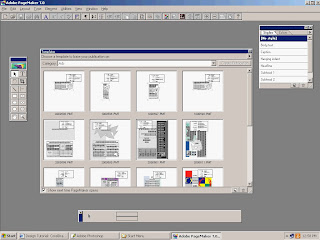
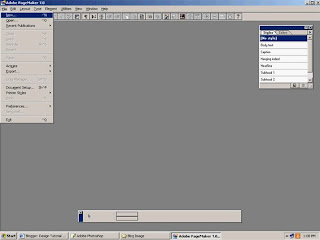
For example, even though the page looks more neat you should change the page size such as edge Dimensions: 215x279, Inside: 10, Top: 10, Outside: 10, Bottom: 10. Click OK then the new page will look like this: Follow the steps in the picture ... OK!
The first step in the design in Adobe PageMaker .....
As always you have to open a new page, with the click File, New


Then you own the page size specified in accordance with your wishes, as shown in the picture below.
For example, even though the page looks more neat you should change the page size such as edge Dimensions: 215x279, Inside: 10, Top: 10, Outside: 10, Bottom: 10. Click OK then the new page will look like this: Follow the steps in the picture ... OK!
Ok Mudah-mudahan anda mengerti dengan maksud Gambar tersebut.
Subscribe to:
Posts (Atom)


0